

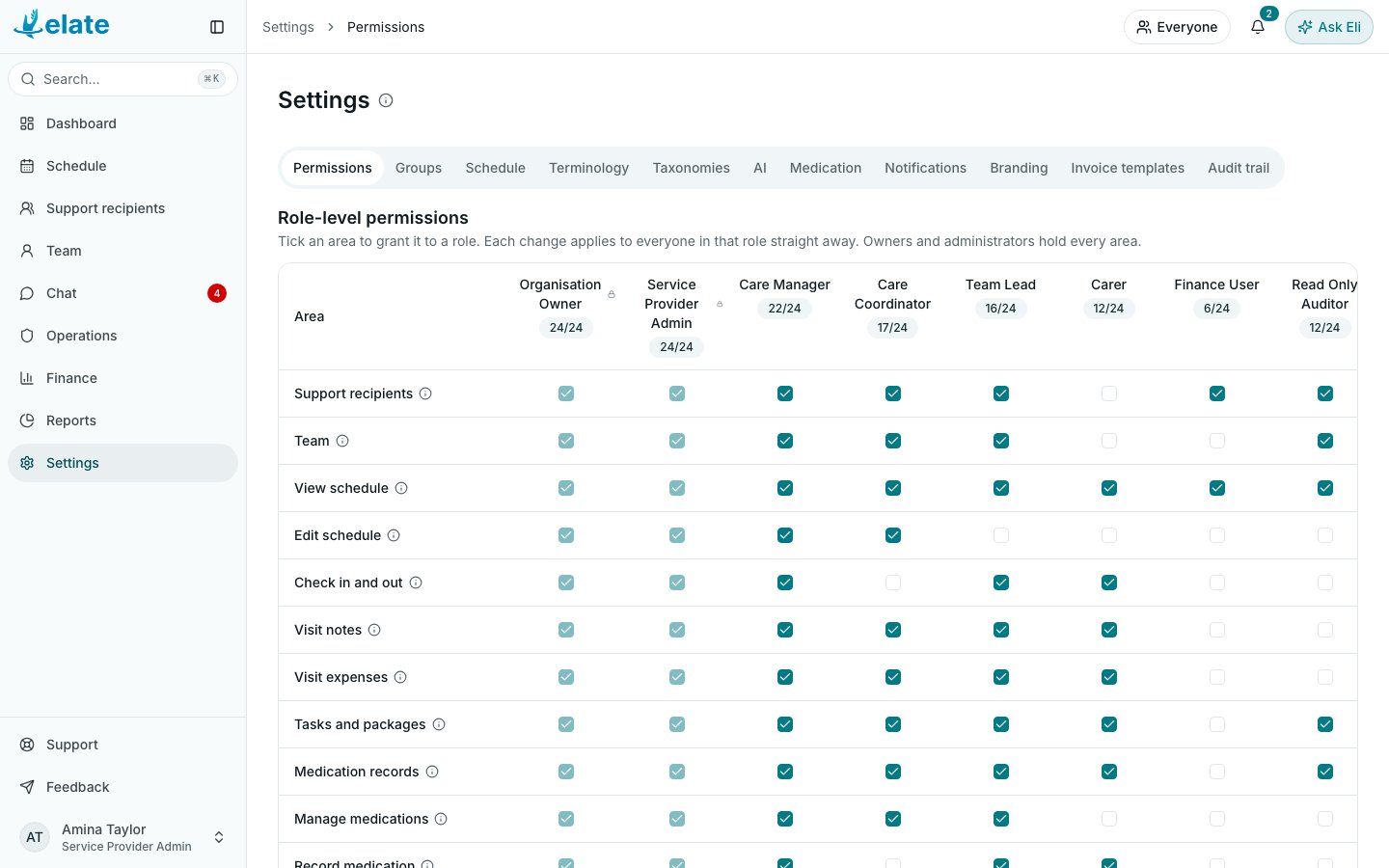
The eight roles
You can see your own role under your name at the bottom of the sidebar. Your Account page lists every permission area your role holds, under Access.
The permission areas
These are the rows in Settings > Permissions. Point at the information icon beside a row to see a short description in the app.
The three medication areas need the Medication (eMAR) module, and AI features needs the AI features module. Without the module, the row shows a note such as Medication (eMAR) is not in your plan and cannot be ticked.
What each role has by default
Organisation Owners and Service Provider Admins hold every area, so they are not shown.Change what a role can do
1
Open Permissions
Select Settings in the sidebar. The Permissions tab opens first, showing Role-level permissions: one row per area and one column per role.
2
Find the area
Find the row for the area you want to change. The count under each role, such as 12/24, shows how many areas it holds.
3
Tick or untick
Tick the box where the area’s row meets the role’s column to give it, or untick it to take it away. There is no Save button: each change applies to everyone in that role straight away.
Rules that always apply
Some things do not follow the matrix:- Reports in the sidebar is only for Organisation Owners and Service Provider Admins, even when another role has Reports ticked.
- Operations is never shown to Carers. Their own incidents reach them on the dashboard and on the profile of the person concerned.
- A Carer without the Support recipients area sees only the people they are connected to, and cannot change their records. A Carer is connected to a person when they are put on one of that person’s visits, or when the office adds the connection.
- A Read Only Auditor can never change a record, whatever is ticked.
- Only Organisation Owners, Service Provider Admins and Care Managers can change permissions and send invitations.
- Nobody can give a role they could not hold themselves: an Organisation Owner gives any role and is the only one who gives or removes Organisation Owner; a Service Provider Admin gives any other role; a Care Manager gives Carer and any role below Owner and Admin that their own role’s permissions cover; anyone else who edits team records gives Carer only. Once someone has joined, only an Owner or Admin changes their role. See Team members.
- Only Organisation Owners and Service Provider Admins can close or restore someone’s account, and see the Branding, Schedule, Terminology, Notifications, Invoice templates, AI and Medication tabs in Settings.